February 2nd, 2026
Attik Update - Data Exports, Repair List Quotes by Thumbtack & more!
Summary
Teams can build and run custom exports with fewer steps.
Repair list quote requests are more guided and easier to manage.
Drafts and scheduling flows are smoother and more reliable.
Report access and client guidance are clearer and more consistent.
Services can be marked so they are never booked as the primary service online or in the scheduler, reducing mistaken standalone bookings.
New Features
Data Exports
What changed: A full report export workspace is now available with saved reports and run history.
Before: Exports required extra steps and were harder to reuse.
Now: Reports can be created, saved, edited, and run from one place.

Why it matters: Teams can pull the exact data they need without rebuilding reports each time.
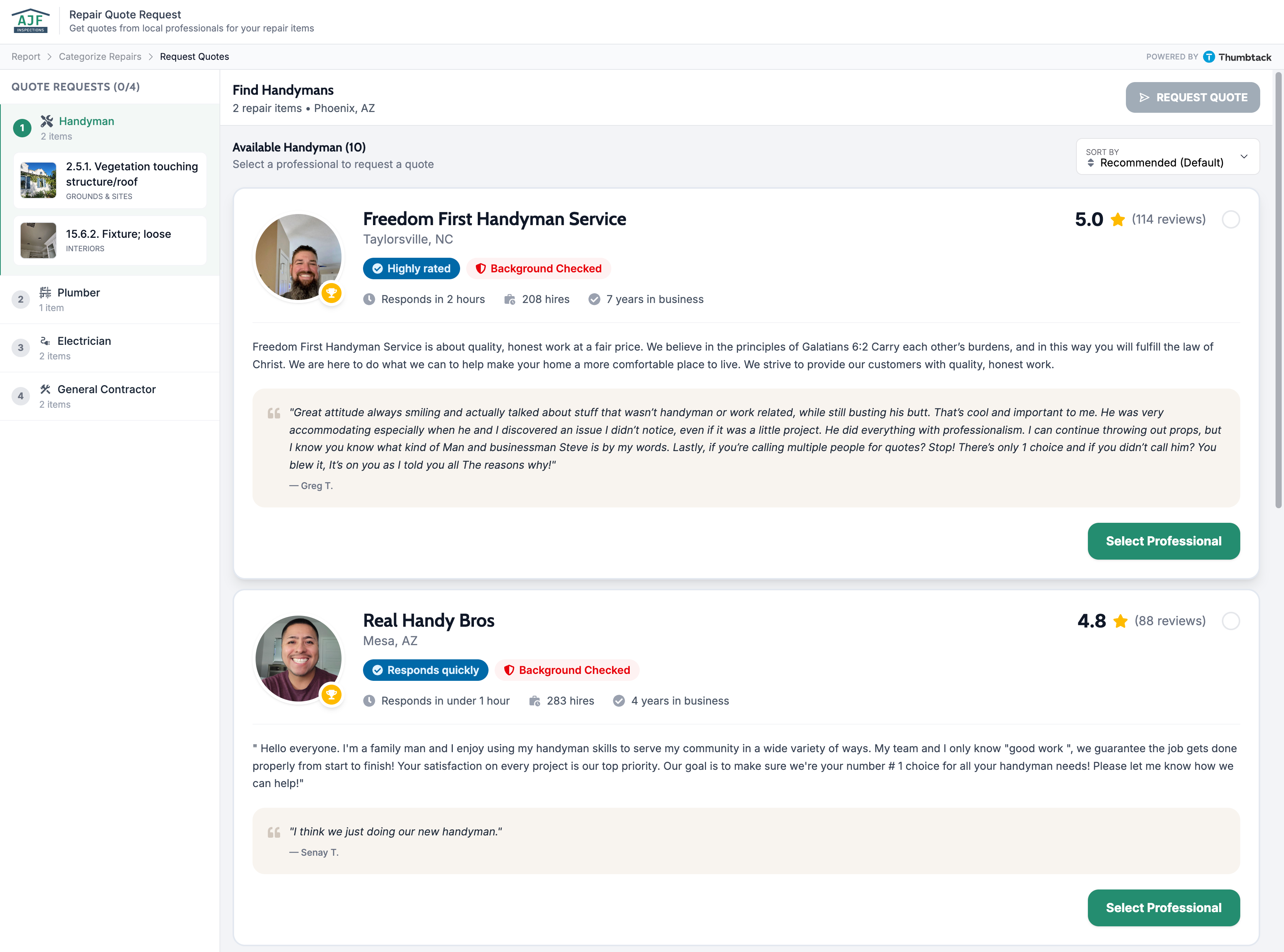
Repair List Quote Requests with Thumbtack!
What changed: Repair list quoting now supports category-based requests, guided questions, and clearer status signals.
Before: Requests were manual and only let you using entered providers
Now: Categories guide the request flow and make it easier to see what has been submitted. The tumbtack flow matches the categories with professionals directly. This beta version is a powerful step for the quote request feature.

Why it matters: Teams can move from repair lists to quote requests faster with fewer missed items.
“Cannot Be Primary" flag on services
What changed: A new setting lets you mark specific services so they cannot be chosen as the primary service when booking.
Before: Any service could be selected as the primary service in online search and in the scheduler, so add-ons or follow-up services were sometimes booked as standalones by mistake.
Now: Services marked with this setting no longer appear as primary options in online booking or in the scheduler; they can only be added as add-ons or secondary services.
Why it matters: You control which services are offered as main offerings versus add-ons, so customers and staff cannot accidentally book the wrong thing as the primary service.

Drafts in Scheduling
What changed: Draft quotes can be saved, resumed, and managed directly in scheduling.
Save Draft

Before: Drafts were easier to lose and harder to resume.
Now: Drafts are visible in the scheduler on reload

Why it matters: Teams can pause and resume work without re-entering details.
Merge Contacts
What changed: A full merge flow helps combine duplicate contacts with side by side comparisons.
Before: Duplicate contacts were harder to clean up and verify.
Now: Merge options and history are visible during the process.
Merge contacts

Search for contact to merge with

Search for the contact you would like to merge with while keeping the contact you currently have selected in view. Select the contact you would like to merge with and move on to compare the information

Choose which values you would like to use in your merged contact profile and then you can finalize the details and merge.


Why it matters: Teams can keep records clean without manual cleanup.
Worklist Unconfirmed Orders
What changed: Unconfirmed orders now appear as a dedicated worklist view.
Before: Unconfirmed work was harder to find quickly.
Now: The worklist surfaces unconfirmed items directly.

Why it matters: Teams can follow up faster and reduce missed confirmations.
Improvements
Invoice Flag Access
What changed: Jobs marked for invoicing have clearer access rules for reports.
Before: Report access could feel inconsistent for invoiced jobs.
Now: Access follows the invoicing path more predictably.
Why it matters: Clients see the right next step without confusion.
Report Lock Guidance
What changed: Locked report screens now explain what to do next.
Before: Locked reports were less clear about next steps.
Now: Guidance is clearer and more consistent across report views.

Why it matters: Clients can unblock themselves without extra support.
Quote Lead ID Tracking
What changed: Lead tracking is built into the quote screen with safer removal.
Before: Lead details were harder to set or remove during quoting.
Now: Lead details are easier to manage with confirmation prompts.
Why it matters: Teams keep marketing attribution intact with fewer mistakes.
Office Staff Email Alerts
What changed: Email delivery issues trigger a group alert for office staff.
Before: Delivery failures could be easy to miss.
Now: The office team gets a clear notification when a message fails.

Why it matters: Follow up happens faster and fewer messages are lost.
Required equipment details in quotes
What changed: Quotes now include more detail about required equipment.
Before: Some quote details were missing or incomplete.
Now: Requests include clearer equipment needs.
Why it matters: Providers receive better context and can respond more accurately.
Bug Fixes
Merge contacts page access restored
What changed: The merge contacts page now loads correctly on staging.
Before: The page returned a not found screen.
Now: The page loads as expected.
Why it matters: Teams can complete merges without detours.
Client report list clean up
What changed: The client report list hides internal or incomplete reports.
Before: Clients could see reports that were not ready for them.
Now: Only completed, client ready reports appear.
Why it matters: Clients see only the right reports.